Free Salesforce app
One screen that shows what is inside your Salesforce org.
Stop clicking through twenty Setup pages to answer "what is in this org?". Org Overview 360 reads the metadata and shows the whole picture on one Lightning page, with a link to the right Setup page on every row.
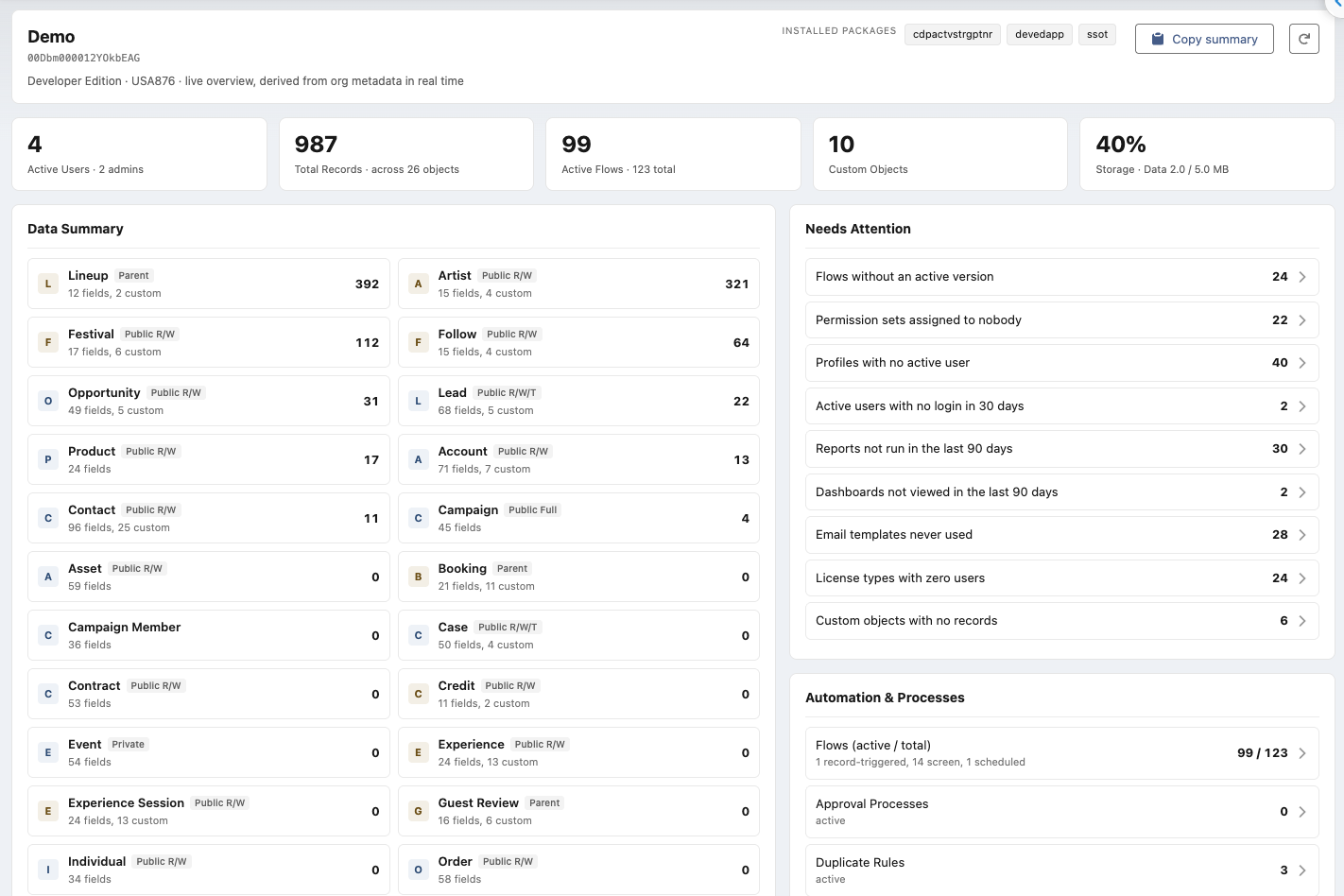
Headline numbers, Data Summary and Needs Attention. Every row opens the matching Setup page.
What you get
Everything an admin asks on day one, answered on one page.
Headline numbers
Active users and admins, total records, active flows, custom objects, data storage.
Data Summary
Every standard and custom object with record count, field count, custom field count, org-wide default, and the flows and triggers attached to it.
Needs Attention
Twelve cleanup checks that Setup never puts in one place. See the list below.
Recent Setup Changes
The last ten entries from the Setup Audit Trail: who changed what, and when.
Automation, code, integrations, access
Flows, approvals, duplicate rules, queues, reports, Apex, Visualforce, named credentials, connected apps, API usage, profiles, permission sets, roles, org-wide defaults, licenses.
Copy summary
One button copies the whole screen as Markdown. Paste it into a ticket, a handover document or a chat.
Needs Attention
Twelve checks, each one a link to where you fix it.
- Flows with no active version
- Permission sets assigned to nobody
- Profiles with no active user
- Active users with no login in 30 days
- Active users that are frozen
- Reports not run in 90 days
- Dashboards not viewed in 90 days
- Email templates never used
- License types with zero users
- Custom objects with no records
- Apex classes below API version 50
- Data storage or API usage above 80 percent
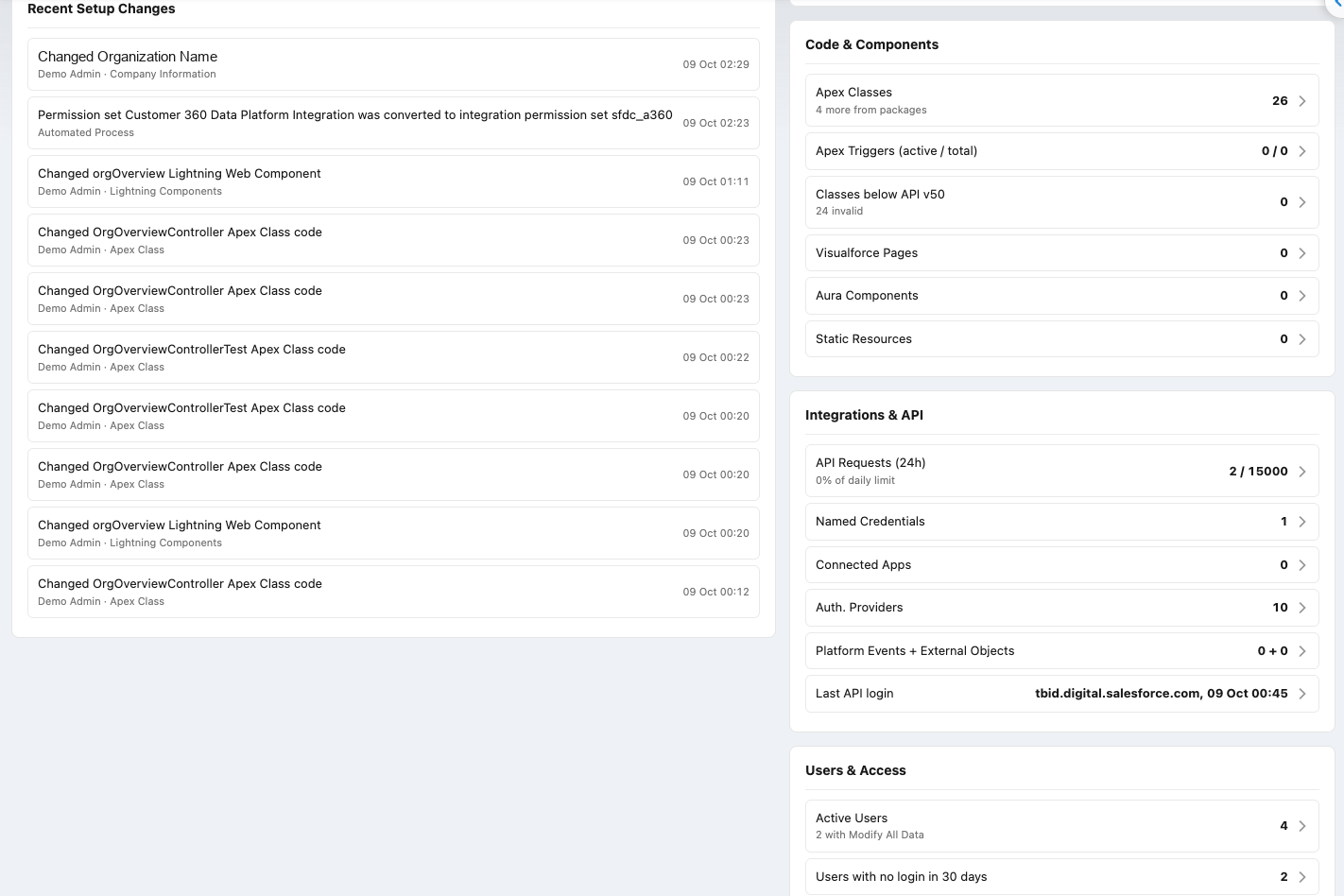
Recent Setup Changes on the left; Code, Integrations and Users on the right.
Safe by design
Read-only, and it runs with your permissions.
Nothing leaves your org
The app makes no external calls, stores no data and never writes to your org. Uninstall and nothing is left behind.
Nobody sees more than Salesforce allows
Every query runs in user mode with the viewer's own permissions. Users without "View Setup and Configuration" get a clear message instead of numbers.
Installation
Three steps, no configuration.
- Install the package from AppExchange for admins only.
- Assign the permission set Org Overview 360 Admin to the people who should see the screen.
- Open the App Launcher and choose Org Overview 360. Optional: add the component to a Home page or the utility bar from the Lightning App Builder.
AppExchange listing in preparation. Want early access or a demo? Write to info@digitalforce360.com.
Questions
Short answers.
Is it really free?
Yes. No licence, no trial clock, no paid tier inside the app.
Which editions does it support?
Enterprise, Unlimited, Performance and Developer editions on Lightning Experience. Professional Edition is being verified during the AppExchange review.
What permission does a user need?
View Setup and Configuration. The included permission set grants the app, the tab and the Apex class; it does not grant any data access.
Does it work in large orgs?
Yes. Record counts are fetched in small batches. In orgs with hundreds of custom objects the first 150 are counted automatically and the rest on request.
Why are validation rules and test coverage missing?
Those live only in the Tooling API, which needs an extra connection. Version 1.1 adds them as an optional, admin-configured feature.
Who built it?
digitalforce360 OÜ, a one-architect company in Tallinn. See About.